
TRUABUTMENT DIGITAL ALL-ON-X
Every major step.
One connected
ecosystem.
From the first bite reference to the final restoration, discover a family of solutions built around your digital full-arch workflow.
Explore the solutions ↓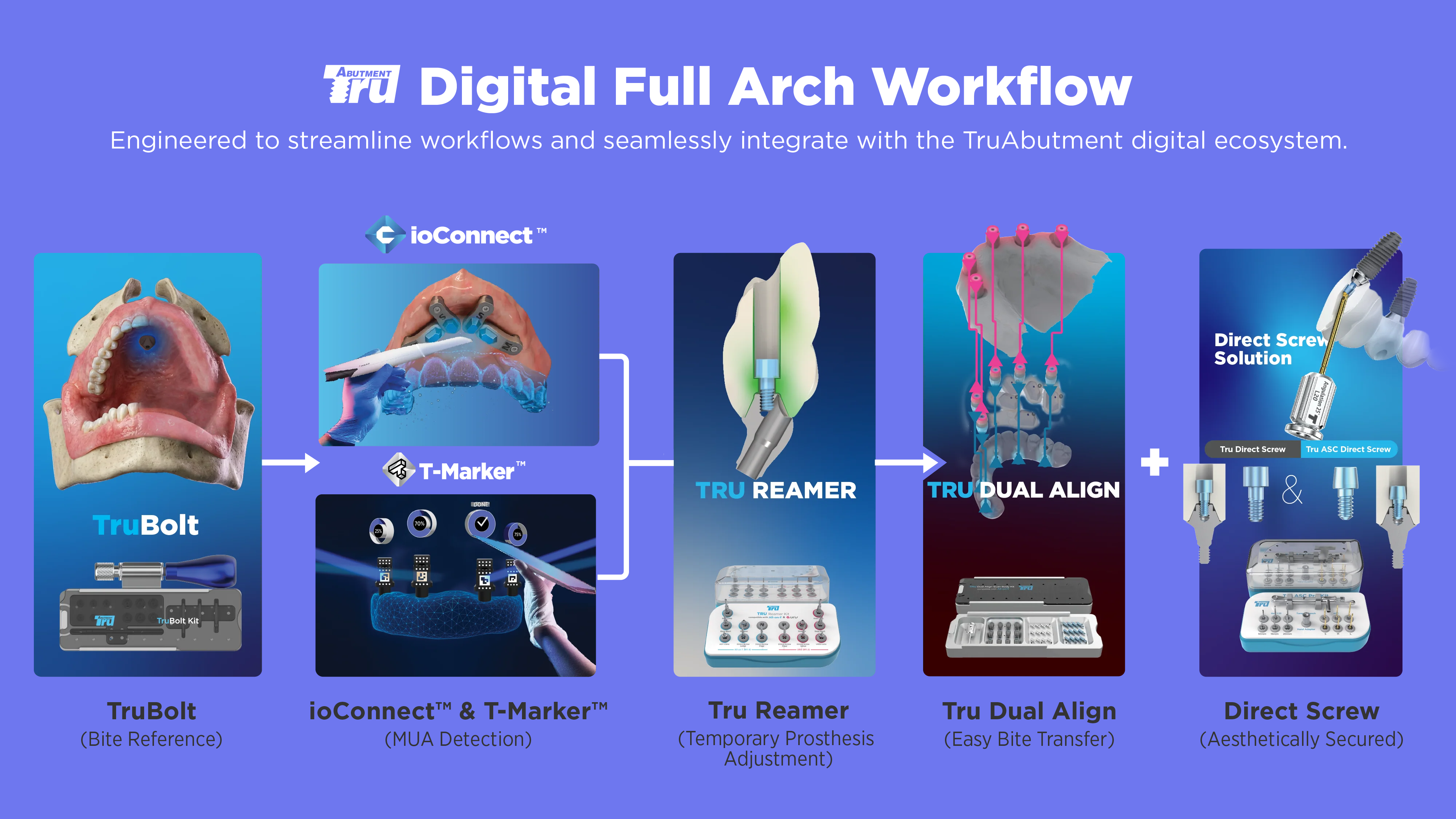
Choose the components that match your case and digital workflow.
ONE WORKFLOW. CONNECTED SOLUTIONS.
See how it all comes together.
Explore the role of each product, from recording a reference to securing the restoration.
01 BITE REFERENCE
TruBolt
Start with a reference you can carry forward.
A fiducial marker solution for establishing reference points in the digital full-arch workflow. TruBolt supports the alignment of records as the patient moves through treatment.
Establish reference points to support the transfer of bite information between treatment stages.
02 IMPLANT POSITION CAPTURE
ioConnect™ / T-Marker™
Two pathways to capture implant positions.
Choose the acquisition method that suits your equipment and clinical workflow.
An intraoral scanner-based solution for capturing multi-unit abutment positions.
A photogrammetry solution using compatible iPhone or iPad devices and dedicated scan flags.
Provide implant position information for the digital prosthetic workflow.
03 TEMPORARY PROSTHESIS ADJUSTMENT
Tru Reamer
Refine the provisional stage.
A dedicated instrument solution for adjusting screw-access areas in temporary prostheses, supporting the finishing process before the next stage of treatment.
Support the preparation and adjustment of the temporary prosthesis within the full-arch workflow.
04 BITE TRANSFER
Tru Dual Align
Carry the bite into your digital design.
Connect Dual Align scanbodies to a denture or provisional prosthesis and scan it outside the mouth with an intraoral scanner. Use this record with the corresponding intraoral scans to support bite transfer.
Link the denture or provisional record with the digital restorative workflow.
05 DIRECT-TO-MUA RESTORATION
Tru Direct Screw
A direct connection.
A considered approach to stress.
Tru Direct Screw secures a suitably designed full-arch prosthesis directly to compatible multi-unit abutments (MUAs), without an intervening Ti-base.
Its flat contact geometry is designed to accommodate small fabrication deviations and distribute tightening forces more evenly.
Simplify the interface
A direct-to-MUA approach removes the Ti-base bonding step in suitable designs.
02 / GEOMETRYDesigned for real-world tolerances
TruAbutment presents the flat design as an alternative to tapered screw contact, which can concentrate stress when fabrication deviations affect seating.
03 / AESTHETICSRedirect the access channel
The ASC version allows channel angulation up to approximately 25°, offering flexibility in access-hole positioning.
For compatible resin or PMMA provisionals, Tru Reamer prepares the MUA housing and Direct Screw channel. The connection design and the preparation tools work together within the same ecosystem.
Select the matching screw, CAD library and driver for the MUA system. This design does not replace accurate scanning, manufacturing or clinical fit verification.
Explore the manufacturer’s Direct Screw brochure ↗THE TRUABUTMENT ADVANTAGE
Think beyond a single product.
Connect the whole workflow.
Bite reference. Position capture. Provisional adjustment. Bite transfer. Final restoration. TruAbutment brings solutions for these major stages into one digital ecosystem, helping clinicians and laboratories plan the full journey together.
Revisit the workflow ↑The sequence shown is a workflow overview. Product selection and clinical steps depend on the case, system compatibility and the applicable instructions for use.